


In the world of PC gaming, performance and visual fidelity often come at the cost of one another. That’s where upscaling technologies like NVIDIA’s DLSS (Deep Learning Super Sampling) and AMD’s FSR (FidelityFX Super Resolution) come into play. As of 2025, DLSS 3.5 and FSR 3 represent the latest advancements in these respective technologies. Both aim to enhance performance by rendering games at lower resolutions and then intelligently upscaling them, delivering high-quality visuals with higher frame rates.
But which one truly delivers the best real-world gaming experience? Let’s dive into a detailed comparison based on image quality, frame generation, performance, compatibility, and usability in real games.
Understanding DLSS 3.5 and FSR 3
Table of Contents
DLSS 3.5 is NVIDIA’s latest take on its AI-powered upscaling technology. It not only includes the benefits of previous DLSS versions like temporal image reconstruction and frame generation but introduces Ray Reconstruction—a neural network that replaces traditional ray tracing denoisers for more accurate lighting and shadow detail. DLSS 3.5 is exclusive to NVIDIA’s RTX graphics cards, primarily the 4000-series and newer 3000-series models.
FSR 3, AMD’s latest iteration, introduces frame generation capabilities similar to DLSS 3.5 but with one key difference: FSR 3 is an open platform. It is compatible with a wider range of GPUs, including older AMD cards, NVIDIA GPUs, and even integrated graphics in some cases. AMD’s goal with FSR is accessibility and wide adoption.
Visual Quality: DLSS 3.5 Focuses on Clean Output, FSR 3 on Sharpness
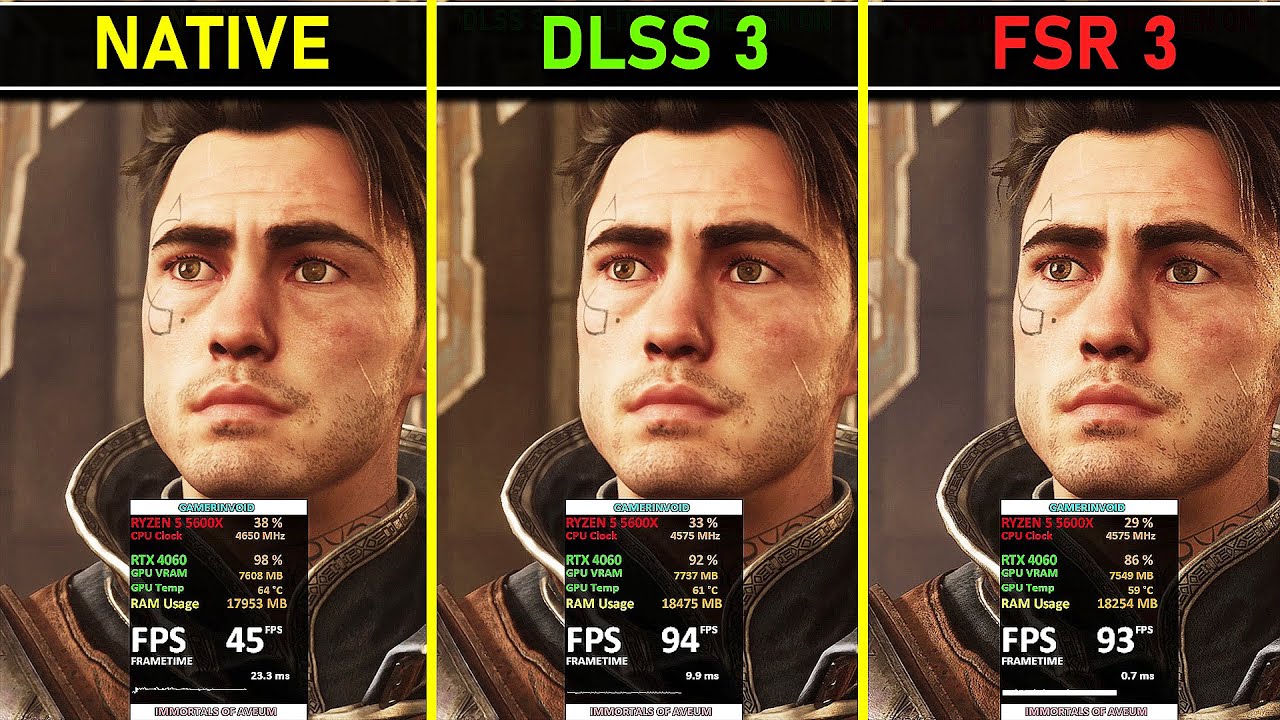
In side-by-side comparisons, the visual differences between DLSS 3.5 and FSR 3 can be subtle but meaningful. DLSS typically delivers smoother, more stable visuals with fewer aliasing artifacts. This is especially noticeable during motion—edges remain clean and shimmering is reduced.
DLSS 3.5’s Ray Reconstruction also improves the realism of lighting in ray-traced games. Reflections, shadows, and global illumination appear more natural and less noisy compared to traditional denoising techniques.
On the other hand, FSR 3 often emphasizes image sharpness. In static scenes or slower-paced games, FSR 3 may actually look crisper than DLSS. However, it can struggle in fast-moving scenes, where pixel crawling and ghosting may occur, especially when frame generation is active.
In general, if your priority is stable image quality and cleaner lighting effects, DLSS 3.5 takes the lead. But if you prefer slightly sharper static images and have a non-NVIDIA GPU, FSR 3 is a respectable option.
Frame Generation: AI vs Algorithmic Interpolation
Frame generation is one of the most significant features introduced in both DLSS 3.5 and FSR 3. It allows the GPU to create intermediate frames using motion data, effectively increasing perceived frame rates without needing full scene rendering.
DLSS 3.5 uses AI-powered Optical Flow Accelerators found in RTX 40-series GPUs to generate frames. This hardware-based solution leads to smoother frame pacing, reduced latency when paired with NVIDIA Reflex, and fewer visual artifacts during quick movements.
FSR 3’s frame generation, while hardware-agnostic, uses motion vector data and other shader-based techniques to interpolate frames. This makes it accessible to a broader audience, but it can suffer from visual inconsistencies and stutter in certain scenarios, especially without a proper frame pacing solution.
In terms of real-world performance, DLSS 3.5 often results in more seamless frame generation. FSR 3 can still be quite effective, especially when used on modern GPUs, but may require additional settings tuning for best results.
Performance Boost: Both Offer Gains, But DLSS Is More Consistent
One of the main reasons gamers use upscaling technology is to boost frame rates, especially at higher resolutions like 1440p or 4K.
DLSS 3.5 provides consistent performance improvements, particularly when paired with frame generation. For example, in demanding games like Cyberpunk 2077 or Alan Wake 2, DLSS 3.5 can double or even triple frame rates when both upscaling and frame generation are active. The added benefit of NVIDIA Reflex reduces input latency, which is important for competitive gaming.
FSR 3 also delivers impressive performance gains. Users with mid-range or older GPUs can see massive FPS increases, particularly at 4K. However, the quality of the upscaled image may fluctuate more compared to DLSS, and frame generation can occasionally introduce noticeable visual artifacts.
Overall, DLSS 3.5 delivers smoother, more stable performance across a wide variety of titles, especially when ray tracing is in use. FSR 3 remains competitive but requires more optimization depending on the game and hardware setup.
Game Support and Integration
One of the key differences between DLSS and FSR is how widely they are supported in games.
DLSS 3.5, being an NVIDIA technology, is often integrated into high-profile AAA titles in collaboration with game developers. Games that support DLSS generally receive updates and optimizations to ensure good performance and visual quality. However, support is limited to RTX GPUs, which can be a drawback for budget-conscious players.
FSR 3 has a broader reach. Because it is open-source and compatible with various hardware, game developers are more inclined to include it as a default upscaling option. Additionally, AMD provides plugins for popular engines like Unreal Engine, making implementation easier.
In terms of raw numbers, FSR may be present in more titles overall, especially indie and mid-tier games. However, DLSS tends to be favored in blockbuster titles, particularly those with heavy ray tracing effects.
Hardware Compatibility: Open vs Proprietary
DLSS 3.5 requires an RTX 20-series GPU or newer, with frame generation specifically tied to the 40-series. Features like Ray Reconstruction are only available on the latest NVIDIA cards. This limitation can be frustrating for users with older hardware.
FSR 3, by contrast, is hardware-agnostic. It works on almost any modern GPU, including NVIDIA GTX cards, AMD RX 5000 series and newer, and even some integrated graphics solutions. This makes FSR 3 the go-to choice for gamers on a budget or with non-NVIDIA systems.
If you’re running older or lower-end hardware, FSR 3 is your best shot at enjoying the benefits of upscaling and frame generation. If you’re using an RTX 40-series card, DLSS 3.5 offers a more premium experience.
Latency and Responsiveness
For competitive gaming, latency is critical. NVIDIA’s Reflex technology, paired with DLSS 3.5, significantly reduces input lag, even when frame generation is enabled. This makes it suitable for action-heavy and multiplayer games, where responsiveness can be the difference between winning and losing.
FSR 3 does not yet have a built-in equivalent to Reflex. While frame generation boosts frame rates, it may also introduce input delay, making it less ideal for esports or twitch shooters unless carefully tuned.
Gaming Experience
In real-world gaming scenarios, both DLSS 3.5 and FSR 3 have their place.
For gamers with high-end RTX GPUs playing cutting-edge titles with ray tracing, DLSS 3.5 offers the most consistent and visually refined experience. Ray Reconstruction, Reflex support, and frame generation work together to deliver beautiful graphics and high performance.
For gamers on mid-range or older systems, FSR 3 brings many of the same benefits without requiring expensive hardware upgrades. It may not always look as clean as DLSS, but the performance gains are significant and often well worth it.
The best choice depends on your hardware and the types of games you play. DLSS 3.5 is the top-tier option for RTX users. FSR 3 is the most accessible and flexible option for everyone else.
Final Thoughts:
So, which upscaler wins in real games?
DLSS 3.5 wins for:
-
Superior image stability during motion
-
Advanced ray tracing support via Ray Reconstruction
-
Hardware-accelerated frame generation
-
Reduced latency through Reflex
FSR 3 wins for:
-
Broad hardware compatibility
-
Open-source implementation
-
Strong performance boosts on a wider range of GPUs
-
Easier integration for game developers
Ultimately, DLSS 3.5 offers better visual fidelity and performance for high-end systems, while FSR 3 makes advanced upscaling technology available to the masses. In 2025, the best upscaler is the one that best suits your hardware and gaming needs.